Competitor Researcher
Know what your competitors are doing, in one report.
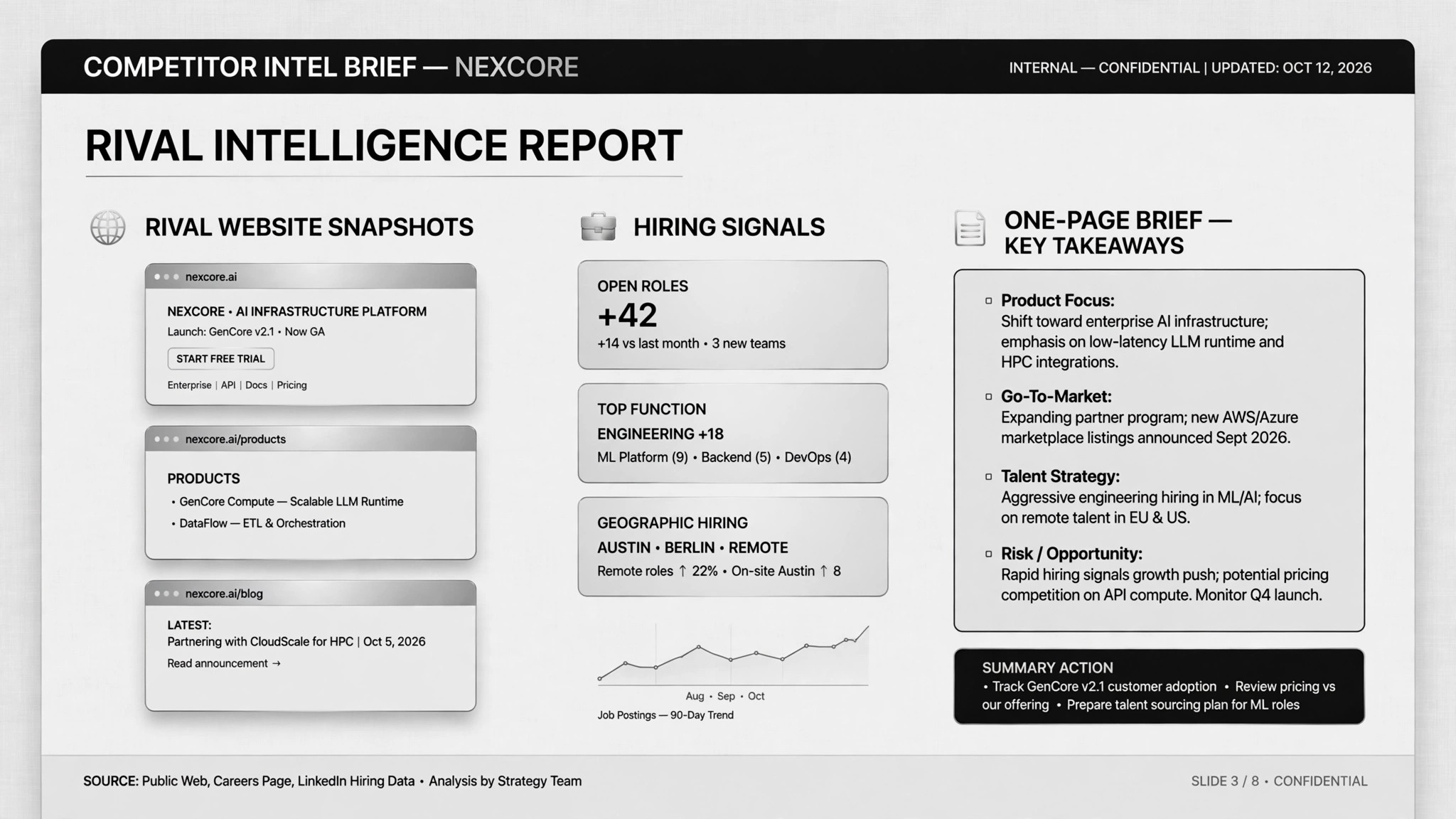
Watches your competitors' sites and job postings, diffs against last time, and hands you a one-page brief with evidence.
Install it in 3 steps
No sign-up. No CLI tools. Pick your AI, copy one line, paste it over.
Prefer doing it yourself? Download the ZIP, unzip it into the directory shown above, restart your AI session — same result.
Real-world proof
Real people did this exact job with AI agents.
Run a Monday competitor-monitoring brief from job listings
Read case →Use caseRun web research jobs and capture screenshots into a doc
Read case →What’s inside
One SKILL.md (the playbook) + one starter template. A preview:
Competitor Researcher
When to use
- You want a Monday-morning snapshot of what competitors changed last week: pricing, features, announcements, hiring
- Job listings are a leading indicator in your market and you want someone reading the signals for you
- You need a one-page competitive brief before a strategy or product meeting
- Pricing pages shift often and you want changes flagged with screenshots as proof
- You'd rather read takeaways than browse five competitors' sites yourself
Workflow
Name 3–7 competitors and what to watch on each site: pricing page, changelog, announcements, careers page. Be specific per site — "keep an eye on Acme" is not a spec.
- Set the watch list (input: competitor names → output: watch list + signals)
On your chosen cadence (the classic is Monday 8am), visit each site, record starting prices and core features, and capture homepage screenshots. Read-only: never submit forms, never apply for jobs, never create accounts.
- Fetch on schedule (input: watch list → output: snapshots + screenshots)
Compare and list only what changed. No change means no entry. This step is what makes the brief worth reading — a dump of everything is not intelligence.
- Diff against last time (input: this week's snapshots + last week's → output: change list)
Read new job descriptions and infer what each hire implies about product direction. Label every inference as inference, not fact — a JD is a signal, not an announcement.
- Read the hiring signals (input: new job postings → output: inferred intentions)
One page: changes summary, the single most important item, and three takeaways for your team. Every claim links to a screenshot or page with a capture date. Anything inferred is labeled as such.
- Write the one-page brief (input: change list + signals → output: brief)
Output spec
- One-page brief per run: changes since last run, the top item, three takeaways
- Evidence appendix: screenshots, URLs, capture dates
- A stored snapshot archive so the next run can diff against this one
- Companion template.md skeleton — fill in the blanks and use it
Good vs. bad examples
- ❌ Bad signal: "Competitor hired a PM — they must be launching something big soon." (stated as fact)
- ✅ Good signal: "Competitor posted 3 ML-engineer roles (links, captured 2026-10-05) — *inference*: likely investing in ML features; *fact*: they have announced nothing" — inference labeled, evidence linked
- ❌ Bad brief: a ten-page dump of everything on competitors' sites, no changes highlighted, no takeaways
- ✅ Good brief: "Changed: Acme raised starter price $19→$24 (screenshot 2026-10-13) — first pricing change in 18 months. Takeaway 1: test our own price-sensitivity messaging this quarter…"
- ❌ Bad research: age